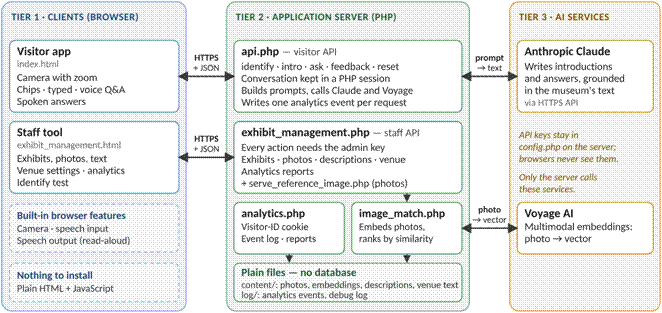
Seba Architecture

Phase 1 Prototype

The Prototype is a simple web app (JavaScript/HTML/CSS) running on a mobile phone.  The middle layer is a PHP based server and uses the Claude API.  The Claude LLM does all the heavy lifting. 

The implementation is independent of the museum or venue.  There is a directory containing all information about the museum on the server, there is one file describing the museum and one file for each exhibit.  The LLM has knowledge of general information on the subject.


Tier 1: The client on the phone

Android/Chrome provides the most flexible platform.  iOS and Firefox are fussy. 

There are two buttons and a scrolling window.  There is a button to scan an image description and a button to speak to ask a follow up question.

On Start up:

·       Send Server a request for “venue_info”.

·       Display venue_info in scrolling window.

·       Display dropdowns for Preference.  The values selected here by the user can be changed during the session.  The values are reread on each subsequent request to the server.

On “Scan Image” button press:

·       Open video window in scrollable pane and display a live view of the front camera.

On “Scan Image” button release:

·       Freeze camera image and copy it

·       Scan for English text in image (using Tesseract OCR)

·       Send text to server as a request to “identify” the exhibit

·       Read and include visitor preferences

·       If the server responds with an error, display error and skip the remaining steps.  Typical errors are:

·       Insufficient text to match known exhibits.  Try again

·       If the server responds “Ok”, then a text description summary will be attached.  Text will be in the selected language.

·       Display text in scrolling view

·       Select speech language and speak the summary

·       For iOS, display a new button for “Press to Speak”.  Speech will start when the button is pressed.

On “Speak” button press:  (Visitor wishes to ask a question)

·       Start listening

On “Speak” button release: 

·       Convert speech to text

·       Send text to server as a request to “ask” a question

·       Read and include visitor preferences

·       Server will send back a response.  Process and speak received text as described above

The Server

On receiving request for 'venue_info':

·       Respond with contents of file “./content/venueHeader.txt”

On receiving request for ‘identify':

·       Use input OCR text to find best matching exhibit.  Use a fuzzy search as input usually contains garbage characters and partial words.

·       If match fails, respond: “Could not confidently match this text to a known exhibit (best score: XX). Try rescanning, closer and better framed."

·       Read in the exhibit file in the /content directory

·       Prepare background and instructions for Claude:

·       Initial instructions: “You are Seba, a friendly museum guide speaking aloud to a visitor….”

·       Add preferences

·       Claude will respond with text in selected language.  The text will describe the exhibit. It will be limited in length to selected number of seconds.

·       The response will be saved in the server’s session history.  Previous history will be discarded.

·       Send Claude’s response to the client.

On receiving request for ask':

·       Send Claude the question being asked

·       Add preferences

·       Add history of the conversation

·       Claude will respond with the answer in selected language.

·       Add the answer to the session history

·       Send Claude’s response to the client.

The Next Implementation

In the three-tier architecture below: the visitor's device handling camera/sensor fusion and audio are at the top, feeding into the cloud AI backend doing recognition, conversational RAG, personalization, and speech I/O in the middle, and the content/analytics platform (knowledge base plus venue console) on the end.  The "Wi-Fi/carrier data" and "grounded answers" are labels showing data flows between tiers.  Each module is detailed below.

Cameras and Sensors

Cameras and Sensors are the most technical risk in the whole system, and also the one most worth getting right, since a wrong ID breaks the "just point and listen" magic immediately. Here's how it works and why it's structured this way.

image002

Why no single sensor is sufficient alone

·       Vision alone is powerful but brittle in real gallery/park/factory conditions: glare off protective glass, low light, crowds occluding the object, near-identical objects sitting a few feet apart (three similar seated Buddha statues from the same period), and the simple fact that a camera has to be pointed at the right thing in the first place.

·       GPS alone gives maybe 3–5 meter accuracy outdoors and far worse indoors — enough to know "you're in the Southeast Asia wing," nowhere near enough to know "you're in front of case 14, not case 15."

·       QR codes alone are 100% accurate but require the visitor to stop, find the tag, and scan it — which breaks the ambient, hands-free experience and won't happen consistently.

·       UWB alone gives excellent positioning but says nothing about orientation — it can tell you which display case a visitor is standing near, not which of the four objects in that case they're actually looking at.

Each sensor is strong exactly where another is weak, so the design is a fusion problem, not a "pick the best sensor" problem.

How the layers combine in practice

·       Coarse localization first (GPS outdoors / Wi-Fi RTT or UWB indoors) narrows the candidate set from "the entire collection" down to "the dozen or so objects in this gallery/zone." This matters enormously for the vision model — matching against 12 candidates is far faster and more accurate than matching against a full collection of thousands.

·       Orientation refinement (gyroscope/IMU, and UWB angle-of-arrival where available) narrows further — which direction is the visitor facing, which case or wall are they oriented toward.

·       Vision does the final, fine-grained identification — confirming exactly which object, using the narrowed candidate set from steps 1–2 as a prior rather than searching cold.

·       Confidence-weighted fallback: if vision confidence is low (glare, occlusion, near-duplicates), the system doesn't guess — it either asks a lightweight disambiguating question ("Are you looking at the standing Buddha on the left, or the seated figure on the right?") or falls back to a QR/NFC tag as a deterministic tiebreaker.

·       Dead-reckoning between fixes: the IMU keeps tracking relative motion between full fixes, so the system doesn't need to re-run expensive vision matching every second — it can predict "visitor is still at the same object" or "visitor is now moving toward the next case" cheaply, only re-triggering full recognition when motion or scene content changes meaningfully.

Why this graceful degradation matters for the business, not just the tech

This layered design is also a deployment/cost story, which matters for how you'd pitch it to venues and investors:

·       A venue can launch with just vision + GPS/Wi-Fi — zero new infrastructure, lowest cost, works day one.

·       If accuracy in a particular gallery isn't good enough (too many similar objects, bad lighting), the venue can add QR/NFC tags cheaply as a targeted fix in just that room.

·       If a venue wants the smoothest, most "magical" experience — or has a genuinely dense, look-alike-heavy collection — they can invest in UWB anchors for that space specifically.

So it's not "pick one sensor and hope," it's a tiered accuracy/cost curve a venue can dial up based on budget and need, room by room.

Where the real difficulty is, worth being candid about

·       Near-duplicate discrimination is the hardest open problem — many collections (religious statuary especially) have multiple visually similar pieces from the same era/workshop, and this is where pure vision models are weakest and fusion/disambiguation prompts matter most.

·       Cold-start in a brand-new venue: the vision model needs reference imagery and training data for every object before it can recognize it — onboarding a new venue's full collection (including the 90% not on display, for cases where storage tours or special exhibits happen) is a real content-ops cost.

·       Model drift with lighting/season changes: outdoor use cases (parks, gardens) see the same subject in radically different lighting, weather, and seasonal states (a tree in bloom vs. bare) — the vision model needs to be robust to that, which is a harder training problem than a static, climate-controlled gallery.

·       Latency: fusion has to feel instant — if it takes 4–5 seconds after a visitor looks at something before audio starts, the "ambient" magic breaks and it starts feeling like a lookup tool instead of a guide.


Audio and input experience

This is the part of the product that visitors actually feel the most — get it wrong and the whole "point and listen" magic collapses into "another museum app with a menu." Here's the fuller picture.

The default: ambient, no-button narration

When the recognition system identifies what a visitor is looking at with high confidence, short-form narration (typically 30–90 seconds, tuned by the personalization engine) begins automatically in the headphones — no tap required. The design goal is that the only interaction most visitors ever need to do deliberately is put their headphones in and start walking. Everything else — starting, stopping, moving to the next piece — happens as a side effect of where they physically are and what they're looking at.

Interrupting and asking follow-ups

A visitor can break in at any point, and the system supports three parallel channels so it works in every venue norm:

·       Spoken question: the visitor just talks — "why does this figure have so many arms?" — and the system pauses narration, listens, answers, and (usually) offers to resume or move on. This needs real interruption/barge-in handling: detecting that the visitor started speaking over the narration, not just after it, and doing it without an awkward wake-word ("Hey Guide...") if possible, ideally via a simple mic-tap-to-talk gesture as the lowest-friction alternative to always-listening.

·       Suggested follow-up chips: after (or during) narration, 2–4 short tappable questions appear on screen — the kind of things most visitors actually wonder ("What does this symbol mean?" / "How old is it?" / "Is there a similar piece elsewhere?"). These are generated dynamically based on the object and the visitor's inferred interest, not a static FAQ list.

·       Text input: a simple keyboard fallback for visitors who can't or don't want to speak — quiet galleries, visitors with speech difficulties, or just personal preference. Text questions get the same RAG-grounded answer, delivered back as audio, on-screen text, or both.

Which channel is emphasized by default is a venue-configurable setting — a boisterous zoo or outdoor park can default to open mic, while a hushed relics gallery can default to chips/text with mic available but not pushed.

Handling "always listening" carefully

Continuous microphone access raises real privacy and battery concerns, so the practical design leans toward push-to-talk or a lightweight local wake-detector rather than a fully open mic streaming everything to the cloud — the phone does on-device voice-activity detection to know "someone is trying to talk to the guide," and only that utterance gets sent for processing. This also helps in noisy environments (crowded galleries, outdoor wind) where always-on listening produces a lot of false triggers.

Multilingual voice, both directions

·       Speech-to-text needs to handle a wide range of languages and accents reliably, including visitors switching languages mid-visit (a family where the parent asks in Vietnamese, the teenager asks in English).

·       Text-to-speech output needs to sound natural and unhurried, not roboticized — this matters more here than in a typical voice-assistant product because visitors are listening for minutes at a stretch, not getting a one-line answer. Voice quality is closer to an audiobook narrator bar than a notifications-reading bar.

·       Language selection is typically set once at the start of a visit but can be changed anytime, and the system should be able to answer a question asked in a different language than the current narration language without forcing a restart.

Headphone and hardware considerations

·       Bluetooth headphones (the visitor's own, or venue-rented) are the primary path; the app should also work with wired headphones for visitors without Bluetooth gear, and with phone speaker at low volume plus captions as a last-resort fallback for visitors without headphones at all.

·       Audio needs to duck or pause cleanly when a phone call or other app interrupts, and resume where it left off.

Group and shared sessions

For families or tour groups sharing one guided experience:

·       One "session leader" device can drive narration and mic input that all linked devices hear, while other members' devices piggyback on the audio stream and can still ask their own follow-up questions without disrupting the group narration.

·       This needs sensible turn-taking: if two people in the group ask overlapping questions, the system queues them rather than colliding audio, and can address group members by their device/name to avoid confusion during multi-person Q&A.

Accessibility as a first-class case, not an add-on

·       Text/visual fallback isn't just a quiet-museum accommodation — it's also how the product serves visitors who are Deaf or hard of hearing (full captioning of all narration and answers) and visitors with speech-related disabilities (text input as a full-parity input channel, not a degraded one).

·       Adjustable narration speed and the ability to request "the short version" or "the plain-language version" of any answer benefits both accessibility and general visitors who just want less.

Where this gets hard, worth flagging for investors

·       Barge-in detection quality is a genuinely tricky ML/UX problem — false positives (system thinks you're talking to it when you're talking to a friend) are annoying, false negatives (you try to interrupt and it ignores you) feel broken.

·       Ambient noise robustness varies wildly across verticals — a factory floor and a quiet gallery are opposite extremes, and the same speech pipeline needs to work in both.

·       Latency budget: the pause-listen-answer-resume loop needs to feel conversational, not like a phone-tree; every added second of lag erodes the "personal guide" feeling.

·       Battery and data usage: continuous camera + audio streaming to the cloud over a multi-hour museum visit is a real power and data draw that needs engineering attention, especially for venues where visitors may not have great cellular coverage indoors.


Recognition Engine

What the recognition engine actually is, mechanically

At its core, it's an embedding-based visual matching system layered on top of the positioning signals. Rather than trying to classify "what object is this" from scratch every time, it works more like this:

·       Reference database: every object in the collection (including the 90% not on display) has been photographed from multiple angles and under varying lighting, and each image is converted into a numeric "embedding" — a vector that captures its visual characteristics — stored in a searchable index.

·       Candidate narrowing (from positioning signals): GPS/Wi-Fi/UWB/IMU data narrows "which objects could this possibly be" from the full collection down to the dozen or so plausible candidates in the visitor's immediate vicinity, before vision even runs. This step matters enormously for both speed and accuracy — matching against 12 candidates is faster and far less error-prone than searching the whole collection cold.

·       Live embedding + similarity search: the camera frame is converted into the same kind of embedding, then compared against just those narrowed candidates using similarity search (nearest-neighbor matching) rather than a full classification model — this is part of why it can stay fast even as the collection grows into the tens of thousands of items across partner venues.

·       Confidence scoring: the similarity score between the live frame and the best-matching candidate becomes a confidence value. This is the number that drives the fork you saw in the diagram — high confidence auto-starts narration, low confidence triggers disambiguation or QR fallback.

Why this design over a single end-to-end classifier

A monolithic "classify this image into one of N object classes" model gets worse, not better, as your collection grows, and it can't easily incorporate positioning as a prior. The embedding-plus-narrowing approach decouples "how big is the collection" from "how hard is each individual match," which is what lets a venue's whole collection — including storage and partner-museum items — sit in the knowledge base without slowing down recognition for what's actually on the floor.

Calibration is its own ongoing discipline

A confidence score is only useful if it's honest. Part of standing this engine up for a new venue is calibrating thresholds against real gallery conditions — glare off glass cases, typical crowd density, lighting rigs — so that "80% confidence" actually corresponds to "right about 80% of the time" rather than being systematically over- or under-confident. This calibration work has to be redone, at least lightly, per venue and per room type, since a sunlit garden and a dim relics gallery behave very differently.

Continuous improvement loop

Every disambiguation prompt and every QR-tag fallback is implicitly labeled training data — it tells the system "vision alone got this wrong here," which feeds back into retraining and re-calibration over time. This is a meaningful long-term data asset: the more visits a venue accumulates, the better the recognition engine should get specifically for that venue's tricky cases (the three similar Buddha statues, the reflective case near the window), which is also a nice retention/moat story for investors — a venue's recognition accuracy compounds the longer they're on the platform.


Conversational AI

This is the piece that decides whether the product feels like "a genuinely knowledgeable guide" or "a chatbot bolted onto a museum app" — and it's also where the factual-accuracy stakes are highest, since a wrong answer about a religious artifact is a very different kind of mistake than a wrong restaurant recommendation.

Why RAG specifically, not just "ask an LLM"

A general-purpose LLM, asked cold about a specific 12th-century bronze in a specific museum's collection, will either say it doesn't know or — worse — generate something plausible-sounding but wrong, because it was never trained on that museum's actual object records, provenance research, or curatorial framing. Retrieval-Augmented Generation solves this by changing what the model is doing: instead of "recall facts from training," it's "read these specific retrieved documents, then answer using only what's in them." That's a fundamentally more reliable and more auditable process for a cultural institution, because you can always trace an answer back to the source records it drew from.

How it works end to end, in this system specifically

1.    Retrieval trigger: once the recognition engine identifies the object (or a visitor asks a question), the system queries the knowledge base — not the whole internet, not general model knowledge, just the venue's curated content for that object and closely related ones.

2.    Candidate document retrieval: the query pulls back the most relevant chunks — wall text, catalog entry, provenance notes, related-object records, previously curator-approved narration — ranked by relevance to both the object and the specific question asked.

3.    Grounded generation: the conversational model then generates its answer using only those retrieved chunks as its source material, with instructions to stay within what's actually supported by them rather than filling gaps with general world knowledge.

4.    Personalization pass: the personalization engine's signals (discussed earlier) shape how that grounded content gets phrased — depth, vocabulary, framing — without changing what facts are asserted.

5.    Citation/traceability: internally, the system keeps track of which source documents contributed to a given answer, which matters enormously for the curator review workflow in the venue console — if something's wrong, you can trace it back to a specific source record rather than treating the model as an unexplainable black box.

Why this matters more here than in a typical consumer chatbot

·       Cultural and religious sensitivity: for a Buddhist relics collection, an answer about iconography, ritual use, or provenance needs to reflect what's actually documented and curator-approved — not a plausible-sounding generalization the model picked up from generic training data about Buddhism, which could easily conflate traditions, regions, or time periods that are actually quite distinct.

·       Provenance honesty: as discussed with the "hidden 90%," some objects have contested or incomplete provenance. RAG grounding means the system can only say what the curated records actually support — including "the provenance of this piece before 1970 is not well documented," rather than generating a confident-sounding narrative that papers over a real gap.

·       Consistency across visitors: two different visitors asking "what does this mudra mean?" should get answers grounded in the same underlying facts, even if phrased differently for their personalization level — RAG makes that consistency achievable in a way that letting the model "know things" generally wouldn't.

Handling the edges — what happens when the knowledge base doesn't have a good answer

This is where a lot of the real engineering and product judgment lives:

·       Honest "I don't know" behavior: if retrieval doesn't turn up strong supporting content, the system should say something like "that's not something we have documented for this piece" rather than generating a confident-sounding guess — this is a deliberate design choice, not a limitation to hide, and it's also exactly the signal that feeds the venue console's "content gaps" analytics discussed earlier.

·       Related-but-not-exact matches: sometimes the best available content is about a similar object or general historical context rather than the specific piece — the system needs to be able to say "I don't have specifics on this particular piece, but here's what's known about pieces like it" without blurring that distinction for the visitor.

·       Out-of-scope questions: a visitor might ask something the knowledge base was never meant to cover (general chit-chat, questions about the museum's cafe, or something entirely unrelated) — the system needs sensible boundaries about what it will and won't attempt to answer authoritatively.

Where this gets genuinely hard, worth being candid about

·       Retrieval quality is the bottleneck, not generation quality. Modern LLMs are quite good at writing a grounded answer given good retrieved content — the harder problem is making sure retrieval actually surfaces the right documents in the first place, especially for questions phrased very differently from how the source material is written (a visitor asking "why so many arms?" needs to retrieve content indexed under "iconography" or "symbolism," not literal keyword matching).

·       Chunking and indexing the "hidden 90%" well is nontrivial — thin, uneven-quality storage records (as discussed earlier) don't retrieve as reliably as polished on-display wall text, which is part of why that content needs real curatorial pass before going live, not just automatic ingestion.

·       Balancing groundedness against natural conversation. Too rigid a RAG constraint produces stilted, robotic-sounding answers that feel like they're reading from a card; too loose, and the model starts blending in ungrounded general knowledge. Tuning that balance — grounded but still natural, warm, conversational — is real product work, not a one-time engineering setting.

·       Latency: retrieval adds a step before generation can even start, which stacks with the speech pipeline latency discussed earlier — the whole "identify → retrieve → generate → speak" chain has to stay fast enough to feel conversational, not like a search engine reading results aloud.

·       Cross-lingual retrieval: if source content is documented in English but a visitor asks in Vietnamese, retrieval has to work across that language gap reliably, which is a genuinely harder retrieval problem than same-language matching.


Personalization engine

The personalization engine is arguably the trickiest and most differentiating piece of the whole system, so it's worth walking through in some depth.

What it's actually solving

A great human docent doesn't recite the same script to a first-grader and a retired art historian — they read the visitor and adjust vocabulary, depth, and even which stories to tell. The personalization engine's job is to approximate that judgment continuously, without ever asking the visitor to fill out a form.

Inputs it draws on

·       Explicit signals (optional, low-friction): a quick opening prompt like "New to this topic / know a bit / quite knowledgeable" or a language/interest picker. Visitors can skip this entirely.

·       Implicit signals gathered as the visit unfolds: dwell time at each object (lingering suggests engagement, a quick glance suggests "move on"), the sophistication of follow-up questions asked ("what's the provenance?" vs. "is this real gold?"), explicit requests like "can you go deeper" or "keep it simple," vocabulary and phrasing the visitor uses, which topics they ask about unprompted (iconography vs. conservation vs. legend/folklore), and pace through the space (someone breezing through 40 objects in 20 minutes wants something different than someone who's spent 15 minutes on three pieces).

·       Session context carried across the visit: earlier answers get referenced later, so the model of the visitor compounds rather than resetting at each object.

How the adaptation actually happens

Rather than a hard-coded "kids mode / expert mode" toggle, it's better thought of as a small set of continuously-adjusted dials:

·       Depth: how much detail, how many facts per object, whether to mention scholarly debate or just the headline story

·       Vocabulary and framing: technical art-historical terms vs. plain language; narrative/legend framing vs. materials-and-technique framing vs. comparative-religion framing

·       Topic selection: which of several true things about an object to lead with — provenance, iconography, conservation story, comparison to other pieces — based on what this visitor has shown interest in

·       Pacing: shorter narration bursts for a visitor who's moving fast, richer narration for one who's settling in

Mechanically, this is a lightweight visitor-state object (not a full profile, just a session-scoped set of signals) that gets fed into the RAG/generation layer as context alongside the retrieved knowledge-base content — so the same underlying facts about, say, a seated Buddha statue get narrated differently depending on that state, without the knowledge base itself needing multiple versions of the content.

A concrete example

Two visitors stand in front of the same 12th-century bronze. Visitor A lingered at the entry hall reading every wall label and asked a detailed question about casting techniques at the previous object — they get a narration that opens with materials and technique, uses precise terminology, and offers a "want the scholarly debate on dating?" follow-up. Visitor B breezed through the entry hall and asked "why does it have so many arms" at the last object — they get a narration that opens with the story and symbolism, plain language, and a lighter follow-up menu.

Where this gets genuinely hard (worth being candid about for investors)

·       Cold start: for the first object or two, there's very little signal — the system has to make reasonable defaults and adapt fast, not guess wildly.  It would start with a image of the visitor taken on the front camera.

·       Avoiding condescension or over-simplification risk: misreading a visitor as a novice when they're not (or vice versa) is a bad experience; the system needs to offer an easy "go deeper" / "simplify" override at all times rather than trusting its own inference completely.

·       Drift and staleness: interests can shift mid-visit (someone arrives following the "art history" thread, then gets pulled into "these were looted and repatriated" territory) — the model needs to weight recent signals more than early ones.

·       Data minimization: session-scoped, not persistent-identity-scoped, personalization is both a privacy win and a technical constraint — nothing should require building a long-term profile of a visitor to work well on a single visit.

This traces the loop: signals in (dwell time, question sophistication, explicit requests, vocabulary) feed the personalization engine, which adjusts depth, framing, topic selection, and pacing, producing adapted output (tailored narration and follow-ups) — and the visitor's reaction to that output becomes the next signal, so the loop tightens as the visit continues rather than resetting at each object.

Speech I/O

This is the layer that has to be invisible when it works and forgiving when it doesn't — visitors won't tolerate a "guide" that stumbles over their language, but they also won't tolerate one that refuses to understand an accent or a mixed-language household. Here's the fuller picture.

Two separate pipelines, often treated as one problem by mistake

·       Speech-to-text (STT): turning a visitor's spoken question into text the conversational AI can reason over.

·       Text-to-speech (TTS): turning the generated answer back into natural-sounding spoken narration.

These have different failure modes and different quality bars, so they're worth thinking about separately even though they sit in the same "Speech I/O" box in the architecture diagram.

Speech-to-text: the harder, noisier half

·       Language identification has to happen fast and often silently — a visitor may have set their profile language at the start, but a family member might ask a question in a different language mid-visit, and the system should handle that without forcing a menu/restart.

·       Accent and dialect robustness matters enormously for a venue with genuinely international visitors — the same question asked by a native speaker and a confident-but-accented second-language speaker needs to land as the same intent.

·       Domain vocabulary is a real tuning problem: proper nouns (deity names, dynasty names, artist names, place names in transliterated Pali/Sanskrit/Khmer/Thai) are exactly the words generic speech models handle worst, and they're also exactly the words visitors are most likely to ask about ("who is Avalokiteshvara again?"). This usually means maintaining a domain-specific vocabulary boost or fine-tuning layer per venue/collection, not just using an off-the-shelf STT model untouched.

·       Ambient noise separation: distinguishing "visitor talking to the guide" from "visitor talking to their friend standing next to them," in a room that may have other narration playing nearby, other visitors' conversations, or (for outdoor use cases) wind and traffic. This is closely tied to the barge-in/push-to-talk design discussed earlier — good noise handling reduces how much you have to lean on an artificial wake-word or button-press.

Text-to-speech: quality bar is closer to audiobook than voice-assistant

·       Because narration runs 30–90 seconds at a stretch rather than a one-line response, robotic or flat-sounding TTS becomes fatiguing fast in a way it wouldn't for a quick Siri-style answer. The bar here is closer to a professional audiobook narrator than a typical notifications-reading voice assistant.

·       Correct pronunciation of specialized terms is a recurring, non-trivial challenge — the same proper nouns that trip up STT (deity names, Pali/Sanskrit terms, artist names in the source language) also need to come out sounding right in TTS, in every supported output language, which usually requires a pronunciation dictionary maintained per collection rather than trusting default text-normalization.

·       Tone and pacing control ties directly into the personalization engine — a narration aimed at a curious child and one aimed at an art historian shouldn't just use different words, they should probably sound a little different in pacing and emphasis too, though this is a more advanced capability than getting the words right first.

·       Voice consistency and brand: most venues will want a small set of consistent, recognizable narrator voices per language (perhaps configurable — a venue might want to license or record a distinctive "house voice" the way audiobook publishers do) rather than a generic default that changes across sessions.

Cross-language continuity

A visitor's conversation history, personalization state, and object context should persist even if they switch languages mid-visit — the system shouldn't lose track of "this visitor already asked about casting techniques" just because the next question came in a different language. That means the underlying reasoning and RAG layer operates on a language-agnostic representation, with STT/TTS as translation-adjacent layers at the edges rather than the language being baked into the core conversation state.

Where this gets genuinely hard, worth flagging

·       Coverage isn't uniform. Speech quality (both STT accuracy and TTS naturalness) varies a lot across languages — major world languages are well-served by current speech models, but some languages relevant to a Southeast Asian collection's visitor base or source-region partnerships may have meaningfully worse out-of-the-box quality, requiring extra tuning investment or accepting a lower bar for those languages at launch.
- Latency budget compounds. STT → reasoning/RAG → TTS is a longer chain than STT → canned response, and every added second in the speech legs erodes the "conversational" feeling discussed earlier — this pipeline needs to be optimized as a whole, not just each piece in isolation.

·       Code-switching visitors (speaking a blend of two languages in one sentence, common in many multilingual households and regions) are a genuinely unsolved-at-the-edges problem for most STT systems, and worth setting realistic expectations about rather than promising seamless handling everywhere.

·       Cost scales with language count and audio volume — high-quality STT/TTS at scale, across many languages, for potentially hours of visitor audio per day per venue, is a real, ongoing infrastructure cost line that should be modeled explicitly rather than treated as a rounding error next to the LLM reasoning costs.


Knowledge Base

This is the part of the platform that turns "audio guide" into something closer to "portal into the entire institution," so it's worth unpacking carefully — both the opportunity and the very real operational lift behind it.

What's actually in the knowledge base

Three concentric layers, roughly in order of how much curatorial work each requires:

·       On-display objects — the ~10% physically in galleries. These typically already have the most complete records: wall text, catalog entries, provenance research, conservation notes, high-quality photography from multiple angles (needed for the recognition engine anyway).

·       Off-display / storage holdings — the other ~90%. Most museums have catalog records for these (accession numbers, basic attribution, sometimes a single archival photo), because collections management systems require it — but the records are often thin, uneven in quality, and not written for a visitor-facing narrative at all. Some pieces may have rich scholarly documentation; others might have little beyond "bronze figure, 11th century, donor X, 1974."

·       Related holdings at partner institutions — pieces from the same period, region, workshop, or even the "other half" of a piece split across two museums' collections centuries ago. This layer only exists where there's a data-sharing or content-licensing agreement in place; it's the richest storytelling layer ("there's a nearly identical piece at the Guimet in Paris, and the two are known to have come from the same votive complex") but also the one most dependent on institutional relationships rather than pure engineering.

Why the "hidden 90%" matters as more than a nice-to-have

·       It directly answers the most natural follow-up question a curious visitor asks — "are there others like this?" — which today usually gets a shrug from even a knowledgeable docent, because that information lives in a spreadsheet in the registrar's office, not in anyone's head.

·       It gives the institution a new way to make its full collection valuable rather than just stored — a piece that never leaves the vault can still be "visited" conversationally, which matters for donor relations, membership perks ("ask about pieces from your family's donation"), and research access.

·       It's a genuine differentiator versus every existing audio-guide competitor I found in the earlier research (AITourPilot, Guru Experience, Hearonymus) — they're all built around narrating what's on the wall, not the collection behind it.

Where the real work is — this is the part worth being candid about for investors

·       Record quality is wildly uneven. Converting "bronze figure, 11th century, donor X, 1974" into something a visitor would actually want to hear requires real curatorial and editorial effort — an AI can draft candidate narration from thin records, but a curator needs to review and correct it, especially for culturally sensitive material, since a confident-sounding but under-researched narrative is worse than an honest "not much is known about this piece yet."

·       Photography debt. Many storage-held objects were photographed once, decades ago, under poor lighting, from one angle — not enough for the recognition engine even if a visitor could see the piece (relevant for touring/rotating exhibitions or "vault tour" special access experiences), and not enough for good generated imagery either.

·       Provenance and rights sensitivity. Some proportion of any large Southeast Asian collection will have provenance questions (colonial-era acquisition, unclear export history) that are actively being researched or disputed. The knowledge base has to represent this honestly — flagging contested provenance rather than narrating around it — which is both an ethical requirement and a real curation workload, not something an AI should paper over with confident-sounding prose.

·       Partner-institution data agreements are a business-development problem, not a technical one. Getting the Guimet, the Met, or a Bangkok museum to share structured collection data means data-sharing agreements, attribution terms, and probably reciprocal arrangements — this is slow, relationship-driven work that doesn't scale the way the software does.

·       Ongoing maintenance. Collections aren't static — pieces get reattributed, provenance research changes conclusions, conservation happens. The knowledge base needs a real update pipeline synced to the venue's actual collections-management system, not a one-time content dump at launch.

A practical phasing implication

Given all that, the realistic rollout for a flagship venue probably isn't "ingest 100% of the collection on day one" — it's closer to: launch with strong on-display content, then progressively bring the storage collection online in curator-reviewed batches (perhaps prioritized by what visitors actually ask about, which the analytics layer would surface), while partner-institution content comes online opportunistically as relationships are formalized. That's a more credible story for investors than promising full depth at launch, and it also turns "how much of the hidden 90% is live" into a legitimate, trackable growth metric over time.


Venue Console

This is the piece that turns the platform from "a nice visitor experience" into something an institution's leadership team actually manages and budgets for — so it's worth treating as a real product surface, not an afterthought dashboard.

Two audiences, two very different needs

The console really serves two distinct groups inside a venue, and conflating them tends to produce a dashboard that serves neither well:

·       Curators and content staff — need to review and approve AI-drafted narration, correct factual errors, flag culturally sensitive material for extra scrutiny, manage the phased rollout of the "hidden 90%," and configure tone/voice per venue.

·       Leadership and operations staff (director, membership, marketing, visitor services) — need to see engagement patterns, make the business case for renewal/expansion, and act on what's working or not.

Content and curation tools

·       Review queue: AI-drafted narration for newly ingested objects sits in a queue for curator approval before it ever reaches a visitor — nothing goes live unreviewed. Curators can edit tone, depth, or facts directly, and can attach source citations.

·       Sensitivity flags: a way to mark objects or entire categories (contested provenance, sacred/ceremonial status, human remains, community-restricted content) that require extra review, a different narrative framing, or an outside advisor's sign-off before going live — this matters a lot for a Buddhist relics collection specifically, and should probably be a first-class workflow rather than a bolt-on.

·       Version history: since scholarly understanding of a piece can change (reattribution, new provenance research), the console keeps a record of what the AI has said about an object over time, so a venue can audit or correct past narration if something turns out to be wrong.

·       Voice and tone configuration: per-venue settings for formality, reading level defaults, and house style — so a children's science museum and a solemn relics gallery don't sound the same by default.

Analytics dashboard

·       Engagement metrics: dwell time per object, completion rate of narration (do people listen to the end or wander off), which objects get the most follow-up questions, language mix across visitors, time-of-day and day-of-week visitation patterns.

·       Content gaps: surfaces objects where visitors ask questions the system couldn't answer well — this is one of the most valuable feedback loops in the whole product, since it turns visitor curiosity directly into a prioritized curatorial to-do list ("237 visitors asked about this piece's provenance and we have no good answer — research it").

·       Drop-off and confusion points: places in a gallery where visitors seem to get lost, linger without engaging, or where recognition confidence is chronically low (signaling maybe a lighting fix or a QR tag is needed in that spot).

·       Conversion signals: correlation between engagement (e.g., asking deep questions, spending long dwell time) and downstream actions like membership sign-up or gift-shop visits, where the venue has instrumented those funnels — this is the data that helps a membership or development team make the case that the platform is worth its subscription cost.

·       Cohort views: comparing engagement across visitor segments (families vs. solo visitors, first-time vs. repeat, tour-group vs. self-guided) to inform programming decisions.

Why this matters as much as the visitor-facing experience, for the business itself

Frankly, this console is a big part of why a venue would pay for the platform on an ongoing basis rather than treating it as a one-time app project. Most institutions today have almost no visibility into what's actually happening exhibit-by-exhibit — this dashboard is a genuinely new capability, not just an add-on to the guide experience, and it's the kind of thing a museum director can show their board to justify the budget line.

Where this gets harder than it looks

·       Data literacy varies a lot across venues. A large national museum might have a dedicated visitor-research team ready to dig into cohort data; a small city garden might have one part-time staffer. The console needs a genuinely simple, actionable default view (not just raw dashboards) for under-resourced venues, with deeper drill-down available for those who want it.

·       Privacy-preserving analytics. All this insight needs to come from aggregate, de-identified visitor behavior, not individual tracking — which shapes what can be measured (you can say "visitors who ask deep questions convert to membership at 2x," but shouldn't be tracking which specific visitor did that without clear consent).

·       Actionability, not just measurement. A dashboard that shows "object #214 has low engagement" is only useful if it's paired with a workflow to actually do something about it — reassign a curator to improve the content, adjust the physical placement, or deprioritize it in future exhibitions. The console needs to close that loop, not just report numbers.